How to have an Ethereum wallet without using any online wallets


In this tutorial, we'll learn how to generate a pair of Public and private keys for all the currencies that support BIP39 or BIP44 (like Bitcoin, Ethereum, Litecoin, etc ...). Before starting the tutorial, i may point that any cryptocurrency wallet is the sum of private keys from which we can generate their public keys (from one private key we can generate a public key. There many versions of public keys, but this is not the goal of our tutorial).
So, anyone who have a private key of an address can access to the funds stored there. Like an account in a bank, the RIB/SWIFT/IBAN are the public keys and the confidential and secret code are the private keys. In, this tutorial i'll use the multi cryptocurrency wallet provided by Jaxx.io supporting BIP44 protocol

Step1:

Download the wallet from the website: https://jaxx.io/ then extract the zip.

Step2:

Launch the wallet and make a new wallet. Then choose​ the crytpocurrencies or the token that you'll use in your new wallet (Example: Bitcoin, Ethereum, Litecoin, Golem)


Step3: Exporting your wallet backup

Creating a backup. Open Jaxx wallet then go to Tools -> Backup wallet -> backup wallet -> Clic on accept. You'll see a backup phrase of 12 different words. Those words are the master seeds (backup phrase) of our main HD wallet from which we can generate both private key and public address. Write this master seed in a paper and put it in a safe place. PS: Anyone who has access to these 12 words can easily manage the funds stored in this HD wallet. After writing the back up phrase, clic on Continue and check if what you've written if correct or not. If everything is correct you'll see a "Success" message.


Also, you can export one pair of Public and private keys within Jaxx. Go to Tools -> Display private keys -> Ethereum keys And you'll see your pair of Ethereum's Public address and Private key. If you want, write them in a paper and put them in a safe place. The public address is the address that you can give to anyone to send you some ethers and the private key must be secret and only you have access to it.


Advanced steps: Now, we have a Master Seed (12 backup words) and a pair of Public address and Private key. Using MyEthereumWallet: In order to use the funds in the wallet created within Jaxx in MyEthereumWallet. Go to: https://www.myetherwallet.com/ -> Send Ether & Tokens -> Private key And enter the private key exported in the above steps from Jaxx.


Now, we have a Master Seed (12 backup words) and a pair of Public and Private addresses.
MyEthereumWallet: In order to use the funds in the wallet created within Jaxx in MyEthereumWallet. Go to: https://www.myetherwallet.com/ -> Send Ether & Tokens -> Private key And enter the private key exported in the above steps from Jaxx. Now, as you can see, MyEthereumWallet let you see the public address generated from the private keys entered. And as we can see The public address given from Jaxx wallet and MyEthereum wallet are the same. This means, that our keys are valid and if we send money to this address we're safe because we have access to those funds in many wallets.

For security maniacs:

If you're a maniac about security, you can check if the wallet generated from Jaxx are correct or not, you can use this tool in Offline (shutdown your internet or disconnect your PC from internet and lunch it in your browser): Download this tool from Github: https://github.com/Chiheb-Nexus/bip39 With this tool, you can enter your Master Seed and verify the keys generated are the same like what Jaxx provided, or you can generate a new ones using 12 words of your choice. (This tool can work offline within you browser). Ps: Be sure you select BIP44 in the options.


Bonus: Using Metamask, the Chrome extension: You can import you wallet using the backup Phrase like these pictures:
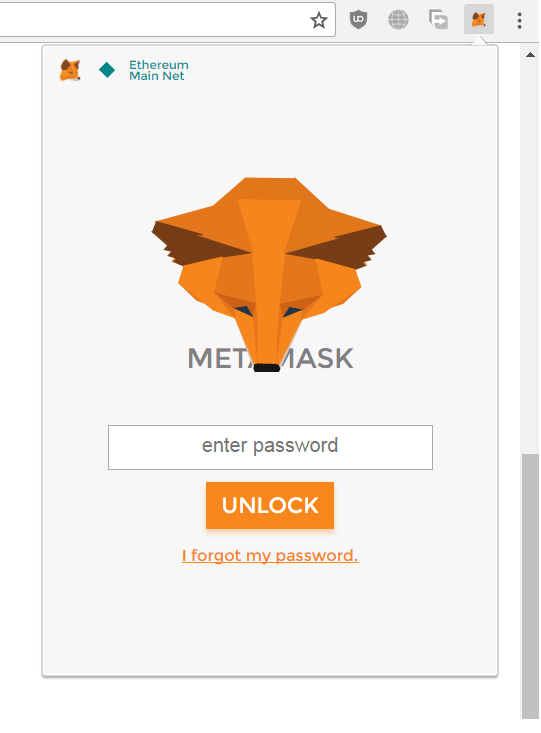


If everything is correct, you'll have access to the funds of your wallet created with Jaxx. Or like Jaxx, you can create a pair of Public and Private keys using Metamask too.

Big thanks to: Jozze Ainsworth for his help.


[Bitcoin] Clé publique, clé privée: Comment vos bitcoins sont protégés


J'ai mentionné à plusieurs reprises les notions de clé privée, clé publique et de signature. Tout ceci va devenir clair dans cet article, qui explique une des clefs de voûte du protocole Bitcoin.
Je ne rentrerai pas dans les détails mathématiques parce que ce blog est destiné à un public plus large que ce que cela impliquerait, mais de nombreuses explications détaillées par exemple de RSA existent sur le net.

Un coffre-fort avec deux clés

Une manière souvent convaincante d'expliquer de quoi il s'agit est d'imaginer que vous avez un coffre-fort avec deux clés. L'une d'elle, la clé publique, permet de l'ouvrir mais seulement pour y déposer quelque chose: vous ne pouvez rien prendre (un peu comme une boîte aux lettres, même si c'est beaucoup plus robuste, heureusement), mais vous pouvez y déposer des objets auxquels seule la propriétaire du coffre-fort aura accès. Cette dernière dispose seule de la seconde clé, la clé privée, qui permet de prendre n'importe quoi qui se trouve dans le coffre-fort.

Et concrètement?

Dans le monde de l'informatique, l'idée du coffre-fort n'est pas celle d'un objet lourd qui est difficile à transporter même si on avait réussi à y accéder:

  1. C'est un fichier au lieu d'un objet, c'est-à-dire que c'est une suite de 1 et de 0. 
  2. Ce fichier est public, au sens où tout le monde y a potentiellement accès et le propriétaire en est conscient.


L'idée est donc de chiffrer ce fichier, c'est-à-dire de le rendre incompréhensible à qui ne dispose pas de la clé privée, qui va permettre de le déchiffrer.
Comme vous l'avez peut-être déjà compris, ces deux opérations correspondent aux deux actions du coffre-fort:

  1. Chiffrer (puis envoyer) correspond à déposer un fichier 
  2. Déchiffrer correspond à récupérer un fichier.


Ce système s'appelle la cryptographie asymétrique, parce que la clé privée et la clé publique ne jouent pas le même rôle (dans le sens où une est publique et l'autre est privée). Pour autant, il est aussi possible de chiffrer un message avec la clé privée et de le déchiffrer avec la clé publique. L'intérêt de faire cela ne réside pas dans le caractère privé du message (n'importe qui peut le lire, puisque la clé publique est.. publique), mais dans la garantie que cela apporte que le message a bien été écrit par Alice. C'est exactement le concept de signature électronique que j'ai mentionné plusieurs fois.

Tout ceci ne s'applique pas qu'à Bitcoin, loin s'en faut, voici quelques exemples:

  1. Le protocole PGP (Pretty Good Privacy) pour chiffrer, déchiffrer et authentifier les courriels; 
  2. Le protocole SSL, qui permet d'avoir le fameux https auquel on vous a sûrement dit de faire attention lorsque vous faites par exemple des paiements en ligne; 
  3. Le protocole SSH, qui permet de se connecter à distance à un ordinateur en chiffrant les données échangées et en évitant d'avoir à rentrer un mot de passe (qui circulerait en clair sur le réseau, et serait donc facile à intercepter).


Le chiffrement

Le chiffrement se fait à l'aide de la clé publique, qui ressemble à ceci:

AAAAB3NzaC1yc2EAAAADAQABAAABAQCiKsw1qHVGSJTi6ntw1HO+FLyaP1Q/ZyZU+nt9IZco93vZTawdftxNCw87krYz+dC78GSLLrj3PFjyxkERZA9ftkUt0VNUUJrsUjp1658ey8kHG1YJfD9Gr3OUYQHCaHwsSZEcwPYcZ5ArtooDetnXdek71GYLFwAfJiSl62i0/BGaxOCvOP8djiFQ6P64pr2i/CyRAdtmJ2lkYKduHyjqmSr37q/s2rARxe+wOYSFU5yTyUodOA3qOxanrb4mYANs6N1xI4SV+EIwBkyRKX9z/T98z+rS4UgFzEkdXsfVGA+Ix7LuhOlBfI2V8Pw0PWHbdf36TZRGZXTVdpcrsotr
Alice peut donner se clé publique à n'importe qui sans aucun risque, tout ce que quelqu'un peut en faire, c'est chiffrer un message avec et lui envoyer.

Le déchiffrement

Le déchiffrement ne peut se faire que par le détenteur de la clé privée, qui ressemble par exemple à ceci:

+Pl+pASjyLG0DDGYSWjzogF0kBRCOroG78SYOPLAwnx4ILkXlpbI6eapBCliQJjw

SMwkaWQXdohJj7Rwr8nBbE1sHGw8Wq2palzEwwPTo1hQEPrDPM4yPl9104NBpn+X

I8iiLKJQPvkQG/sfHjemPAmrA+cVniQKQW8R7ga6EKaLamLqT1TCu+QShe5W+gSl

ulhCOEJZ5n4PE2Q1TjW+FKI4+j4OD445CYdGxP1c68vyDGBW12DiEk26sQ/z7tLa

pO71PfKIxA1P2cFMnQgWIB/ujDc4jWq7bHKV1v9S94GfIF5v8WIScjojIlZUvZm+

eFWq66EfV3t/JSrJT6GznK6xFS4KJ/r0QIS9PQOzBiXgWwSvcDr8/baElxTdhQDN

+adrjxV8vFjo+O0Gj3Xmgna4kpyqjPa1SSIDeRZjUlFduT0EknnkZvLrSZg8htD2 bZjUdUSZRjr/mM/9mqUDRnEgF918ras5f2eSOw1yV7FtipDcpBlFXe6sTPanqpZ6

nSqhBY6/RpZyyeopUyFpGSBYYW++5J04u2YRs2rQlQ3SnPFOjhih33q35mIZQFux

JuOSuvgwo2iX3Bbi7h2J3RlzC1VLJWf860LDkvEFU2KQtEPZf6sAjFPVbXd/ZEWb

nCOql2LTw/eGurnLJwxIWBTNCFAqm7GTvtgusdBAZho1klV4/mFqiWjHRM5gAHZg

7WL2Hhcb27Sj8MzeHDXwYEFdFkd7XMz8j9kPpRpazBAmpq1DrnRDpLJfeKhwZ+QN

Z1drlraTLRP6ldesQBFyD8i8qdYb6V/pOizKF65gwpWQ9fqMA5rhBNJpCC0gh9sZ

k9pcxNoBgrjYdCQuVkAe4yXxkSvOnAI7L2U0zOJ1jIx4gBQUkGj2sht5KMU4+Gem

4b57kWL2GrOBUiH0boJIsxRZjjAdGhy8UUpxXenRCEPOkAeUEhPjIZi1I3gcwrVH

hi8Weyooa354kmPlboXxZnkN0nLzAALBuoRjmfWRfiyEqOQmZwSkA9kK7AHxGDft

Xj1BCOHHR4kRkWWJ1wBijT1pNvD1UKlSg85/+4s3oSnJYqpKRqTZkS/vqcV1SnG/

xBdr7g6kkQLdOMadhv1oAiNJzGQIqvhGZiGOBN9qOjFYhNyip/dwW2bqd7GXSgGu

nqPZIlx437TJUZcyhT58oVLyyJm/wpZF2fHGCPgcFG62R4fwduhBQkLbdDJbBSTz

KirMNaIpeiTknOV7sjUBT1NaLgfoFpRMWUE6d4YpP3sE0gHtc2OQOlrMnbpQz04Q

Eql+Q2gCsjdXgEeFyLds3BvQIcHZnh0y8YT4KwX+ub9Ff1R4V0MgUQP9QpGMO+vY

RNk8TCDY6G0DCq13OpiGry3DJxro51S0DTrSdd39xmK+xymW6cPLd0Cu1vrWguoL

J3Ycbf18wL39wwyl5CcX8uVqvpnM4ZbpOtTv9nvIJx9OzW+0PbuLf5QlWFAP6fDA

IBVPdde04SEgg5Jtr+GpPtJp7f6IPSgCdF0TOg/Zj/asZM3mIQoU+AlOSEsHkt44

o5uF5O6JxNKr1o4qlRZXA7PpKQxIV4uTEaJ50+JWjo7GzyTDO8oGuhT/pYXHyAc4


Comment tout ceci est-il utilisé dans Bitcoin?

Lorsque vous créez un compte Bitcoin, par exemple lorsque vous utilisez pour la première fois un des nombreux logiciels de porte-monnaie Bitcoin (comme le client Bitcoin, Electrum, Mycelium, Blockchain.info), le logiciel commence par créer une paire clé privée/clé publique.

Votre clé privée a le contrôle de vos fonds, c'est donc à peu près aussi confidentiel que votre carte bleue et son code, et même pire: il faudrait quelques millisecondes à quelqu'un de bien organisé pour subtiliser l'intégralité de vos fonds une fois cette clé entre ses mains (alors que les cartes bleues ont habituellement un plafond). Il ne faut donc jamais, jamais, jamais donner votre clé privée à un site, ou vous l'envoyer par mail, ou même la laisser non chiffrée sur un ordinateur connecté à Internet.

Votre clé publique est obtenue comme un hash de votre clé privée. Elle constitue votre adresse Bitcoin, ou plus exactement une adresse Bitcoin (vous pouvez en avoir autant que vous voulez), celle que les gens vont utiliser pour vous envoyer des bitcoins.

Lorsque vous effectuez une transaction, vous devez signer les fonds que vous utilisez, qui ne sont en fait rien d'autres que les "sorties" de transactions précédentes qui vous ont été adressées. Ceci garantit que personne d'autre que vous ne peut dépenser votre argent.

J'ai de bonnes raisons de penser que ma clé privée risque d'être compromise dans un futur proche, que faire?

Créez immédiatement un nouveau compte Bitcoin et reversez tout votre solde dedans. Pas une seconde à perdre.

Comment sécuriser mon compte Bitcoin?

Une des meilleurs manières connues à ce jour de stocker ses Bitcoins à l'abri du vol est le "cold storage", ou "stockage à froid". L'idée est de placer une unique copie de votre clé privée en lieu sûr, par exemple sur un papier que vous mettez dans un coffre-fort (physique, cette fois), ou encore sur un ordinateur qui ne se connecte jamais à Internet. Comme ceci nécessite de dédier un ordinateur complet et n'est pas à l'abri d'une panne de disque dur, les gens choisissent en général le papier.

[1] Pour les petits malins qui pensent que je viens de révéler ma clé privée (ssh en l'occurrence), ne perdez pas votre temps: cette paire a été générée pour les besoins du blog et ne sera jamais utilisée pour autre chose :-)

Source: Blogchain